


No Cart. No Checkout. No Drama! As a VIP member, every single product on our website is unlocked and ready for instant download with just one simple click.
Theranto V3 EA MT4 Unlimited
$15
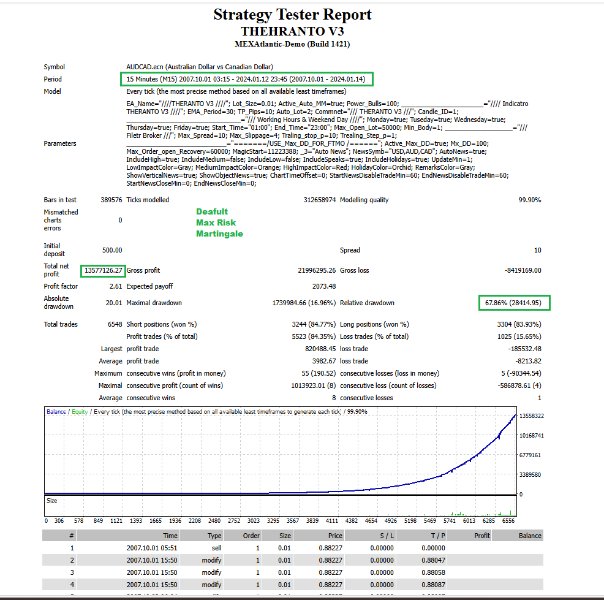
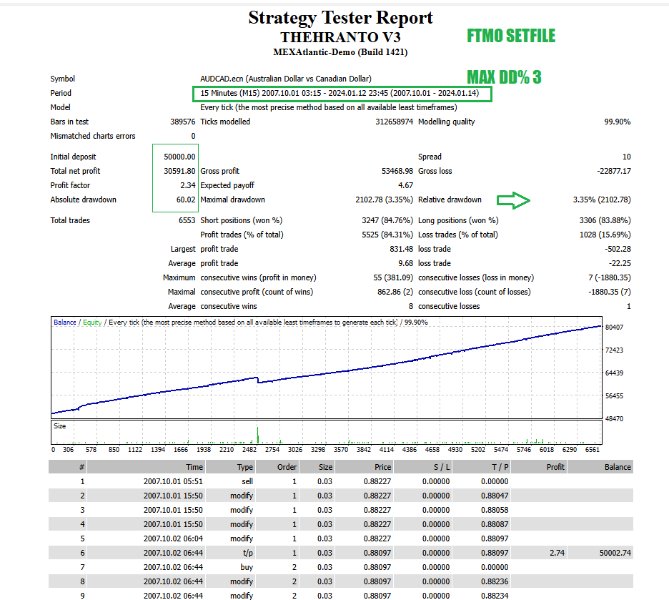
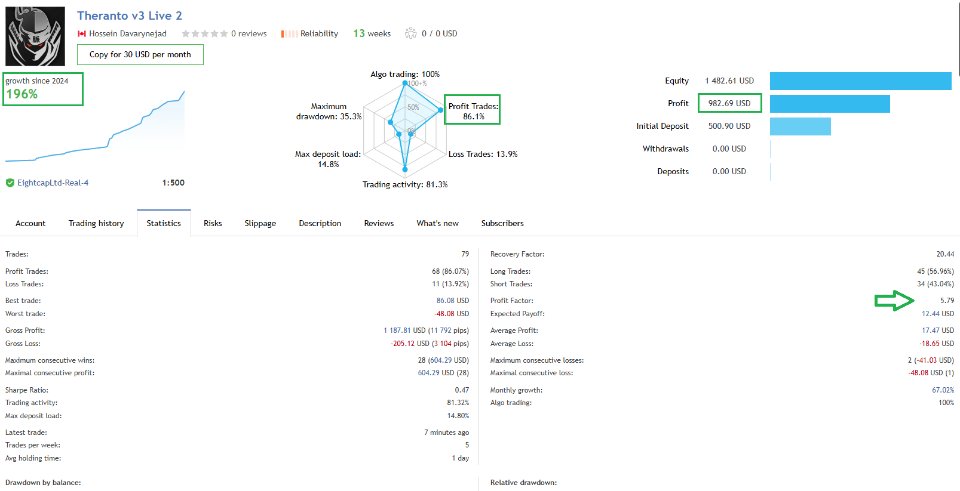
Theranto V3 EA MT4 Unlimited is an automated MetaTrader 4 Expert Advisor designed for M15 AUDCAD and AUD/CAD currency pair trading.
Driven by RSI, ATR, and candlestick pattern pullback analysis, it incorporates trend-following scalping, WebRequest economic news filtering, maximum drawdown risk management, and unrestricted deployment across MT4 ECN accounts.
Sales: HERE
- Instant Download
- Unlimited Version
- Free Future Update
- Safe & Clean File (No DLL)
- 15% Off Crypto Payments
Description
Description
| Category | MT4 Expert Advisors |
|---|
Theranto V3 EA MT4 is a fully automated pullback scalping Expert Advisor developed specifically for MetaTrader 4, engineered to trade AUD and CAD currency pairs on the M15 (15-Minute) timeframe.
Operating on trend-following pullback logic, the system identifies sharp directional expansions and executes high-precision counter-momentum entries during structural retracements.
Theranto V3 EA MT4 Unlimited — AUD & CAD Pullback Scalping Engine
The Unlimited version provides unrestricted deployment rights across MetaTrader 4 accounts, enabling quantitative traders and developers to operate the software across multiple live/demo broker terminals without hardware keys, DLL locks, or execution limits.
Key Operational & Architectural Highlights
-
Smart Pullback Engine: Combines RSI overbought/oversold detection, ATR volatility expansion tracking, and candlestick pattern verification to enter during optimal market retracements.
-
Trend-Aligned Scalping: Filters trades against the broader trend to ensure all pullback entries align with dominant market direction.
-
High-Impact News Protection: Features an integrated economic calendar news filter that pauses execution before and after major macroeconomic announcements to prevent slippage and volatility spikes.
-
Maximum Drawdown Risk Shield: Deploys automated Stop Loss controls driven by account-level maximum drawdown boundaries.
-
24/5 Automated Execution: Designed for continuous M15 operational execution across low-spread ECN broker environments.
Technical Specifications & Recommended Setup
| Parameter | Specification / Recommended Setting |
| Platform | MetaTrader 4 (MT4) |
| Supported Instruments | AUDCAD and AUD / CAD Cross Pairs |
| Primary Timeframe | M15 (15-Minute) |
| Trading Strategy | Pullback Scalping / Trend Following |
| Technical Indicators | RSI, ATR, Candlestick Pattern Recognition |
| Minimum Balance | $500 – $1000 USD |
| Recommended Leverage | 1:500 |
| Account Mode & Type | Hedging / Low-Spread ECN Broker |
| Infrastructure | Continuous 24/5 Low-Latency VPS (Virtual Private Server) |
Core Setup & Installation Workflow
-
Install EA File: Place the Theranto V3 EA.ex4 file into your MetaTrader 4 MQL4/Experts folder.
-
Configure News Filter URL: In MetaTrader 4, navigate to Tools → Options → Expert Advisors, check Allow WebRequest for listed URL, and add the following URL:
http://nfs.faireconomy.media/ff_calendar_thisweek.xml
-
Open Chart: Open an M15 (15-Minute) chart for AUDCAD or AUD/CAD-related pairs.
-
Attach EA & Configure: Attach the EA to the chart, adjust risk/lot allocation settings in the Inputs tab, and verify news filter activation.
-
Enable AutoTrading: Ensure the AutoTrading button is enabled in the MetaTrader 4 top toolbar.
Overview & Operational Summary
Theranto V3 EA MT4 Unlimited delivers a high-precision pullback scalping framework for AUD and CAD pairs on MetaTrader 4.
By uniting RSI and ATR volatility indicators with news filter protection, dynamic drawdown controls, and unrestricted deployment rights, the EA offers a practical automated solution for low-spread ECN trading environments.